
三種WordPress分類目錄頁文章置頂的方法_插件_代碼
本文圍繞“三種WordPress分類目錄頁文章置頂的方法_插件_代碼”整理操作說明與配置思路。界面名稱可能隨軟件版本調整,修改線上網站前請保存備份。涉及使用體驗的描述屬於來源作者,本頁未提供獨立實測結論。 WordPress文章置頂顯示想必你知道怎麼實現,只需要在發表文章的時候勾選在博客中置頂( 將

基本資訊
- 資料範圍
- 完整文章正文,已清理外鏈和來源推廣
- 正文插圖
- 3個真實URL;3張已本地化,其餘使用原圖待補
本文圍繞“三種WordPress分類目錄頁文章置頂的方法_插件_代碼”整理操作說明與配置思路。界面名稱可能隨軟件版本調整,修改線上網站前請保存備份。涉及使用體驗的描述屬於來源作者,本頁未提供獨立實測結論。
WordPress文章置頂顯示想必你知道怎麼實現,只需要在發表文章的時候勾選在博客中置頂( 將文章置於首頁頂端)的選項就可以了。
但是如何設置分類頁面的置頂文章,只在WP分類頁顯示置頂文章不在首頁顯示呢?本文給大家介紹兩款WordPress分類頁文章置頂的插件和代碼實現方法。
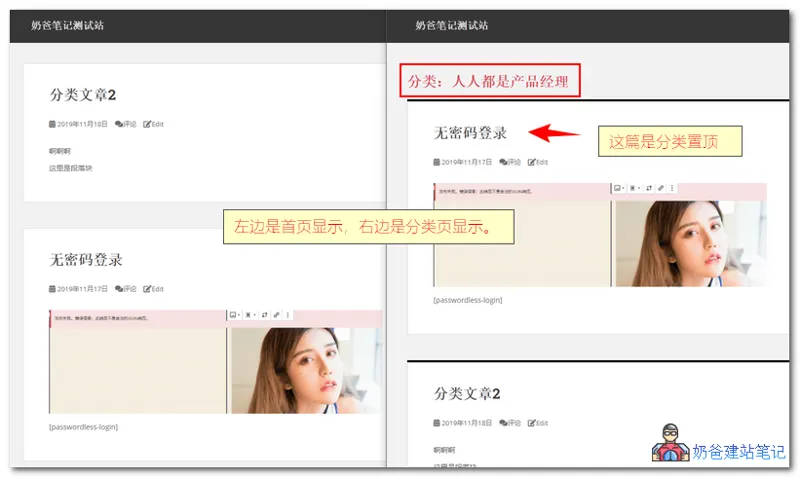
分類目錄文章置頂插件
這裏介紹的可以實現文章在分類頁置頂的插件有兩款,來源作者在WordPrss 5.3版本下測試正常工作。
Category Sticky Post
推薦使用Category Sticky Post這款WordPress插件,可以很輕鬆的實現文章分類頁置頂的效果。
Category Sticky Pos允許您在每個分類目錄頁面置頂顯示指定文章內容。
- 允許您選擇要置頂顯示文章的分類目錄
- 就像內置的置頂功能一樣,在分類目錄置頂顯示文章
- 允許在特定分類目錄顯示不同的置頂文章
- 支持WordPress 5.3
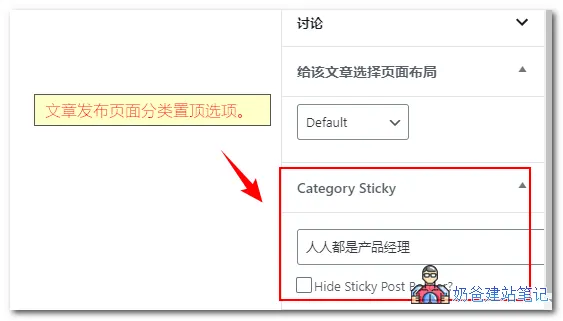 安裝好插件後,發表文章的時候在右側邊欄會出現Category Sticky的選項,選擇你要置頂的分類就可以了。
下載地址
Sticky Posts – Switch
Sticky Posts – Switch插件新一些,支持在分類目錄顯示置頂文章外,還支持標籤頁和自定義帖子類型上顯示。
而且通過該插件置頂的文章在後臺文章列表裏面會顯示一個星星圖標,方便你管理置頂文章。
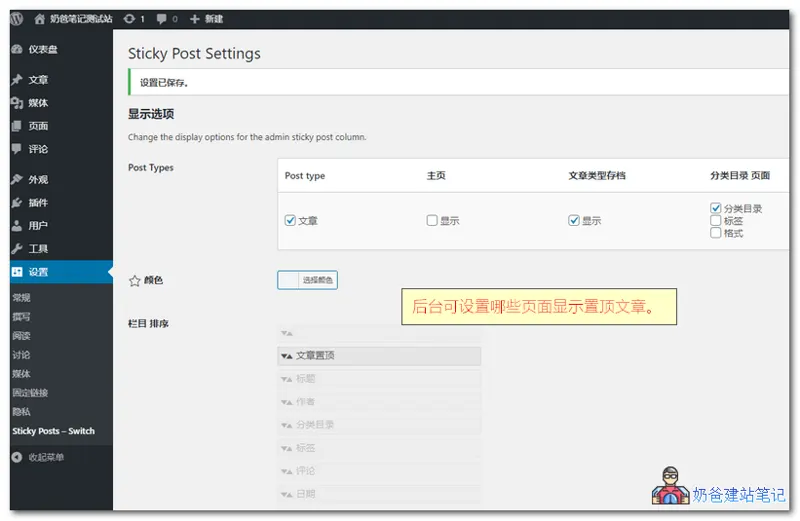
同時,可以在設置裏面顯示是否在首頁展示置頂文章。
下載地址
代碼實現分類顯示置頂文章
代碼版來源作者沒有測試,不想使用插件的可以自己研究一下代碼實現方法。
在你主題函數文件functions.php裏面插入下面的代碼,如果不知道怎麼插入,可以使用插件幫忙,參考:安全添加代碼到functions.php文件的方法:Code Snippets
add_filter('the_posts',  'putStickyOnTop' );
function putStickyOnTop( $posts ) {
  if(is_home() || !is_main_query() || !is_archive())
    return $posts;

  global $wp_query;

  // 獲取所有置頂文章
  $sticky_posts = get_option('sticky_posts');

  if ( $wp_query->query_vars['paged'] <= 1 && !empty($sticky_posts) && is_array($sticky_posts) && !get_query_var('ignore_sticky_posts') ) {
    $stickies1 = get_posts( array( 'post__in' => $sticky_posts ) );
    foreach ( $stickies1 as $sticky_post1 ) {
      // 判斷當前是否分類頁
      if($wp_query->is_category == 1 && !has_category($wp_query->query_vars['cat'], $sticky_post1->ID)) {
        // 去除不屬於本分類的置頂文章
        $offset1 = array_search($sticky_post1->ID, $sticky_posts);
        unset( $sticky_posts[$offset1] );
      }
      if($wp_query->is_tag == 1 && !has_tag($wp_query->query_vars['tag'], $sticky_post1->ID)) {
        // 去除不屬於本標籤的文章
        $offset1 = array_search($sticky_post1->ID, $sticky_posts);
        unset( $sticky_posts[$offset1] );
      }
      if($wp_query->is_year == 1 && date_i18n('Y', strtotime($sticky_post1->post_date))!=$wp_query->query['m']) {
        // 去除不屬於本年份的文章
        $offset1 = array_search($sticky_post1->ID, $sticky_posts);
        unset( $sticky_posts[$offset1] );
      }
      if($wp_query->is_month == 1 && date_i18n('Ym', strtotime($sticky_post1->post_date))!=$wp_query->query['m']) {
        // 去除不屬於本月份的文章
        $offset1 = array_search($sticky_post1->ID, $sticky_posts);
        unset( $sticky_posts[$offset1] );
      }
      if($wp_query->is_day == 1 && date_i18n('Ymd', strtotime($sticky_post1->post_date))!=$wp_query->query['m']) {
        // 去除不屬於本日期的文章
        $offset1 = array_search($sticky_post1->ID, $sticky_posts);
        unset( $sticky_posts[$offset1] );
      }
      if($wp_query->is_author == 1 && $sticky_post1->post_author != $wp_query->query_vars['author']) {
        // 去除不屬於本作者的文章
        $offset1 = array_search($sticky_post1->ID, $sticky_posts);
        unset( $sticky_posts[$offset1] );
      }
    }

    $num_posts = count($posts);
    $sticky_offset = 0;
    // Loop over posts and relocate stickies to the front.
    for ( $i = 0; $i < $num_posts; $i++ ) {
      if ( in_array($posts[$i]->ID, $sticky_posts) ) {
        $sticky_post = $posts[$i];
        // Remove sticky from current position
        array_splice($posts, $i, 1);
        // Move to front, after other stickies
        array_splice($posts, $sticky_offset, 0, array($sticky_post));
        // Increment the sticky offset. The next sticky will be placed at this offset.
        $sticky_offset++;
        // Remove post from sticky posts array
        $offset = array_search($sticky_post->ID, $sticky_posts);
        unset( $sticky_posts[$offset] );
      }
    }

    // If any posts have been excluded specifically, Ignore those that are sticky.
    if ( !empty($sticky_posts) && !empty($wp_query->query_vars['post__not_in'] ) )
      $sticky_posts = array_diff($sticky_posts, $wp_query->query_vars['post__not_in']);

    // Fetch sticky posts that weren't in the query results
    if ( !empty($sticky_posts) ) {
      $stickies = get_posts( array(
        'post__in' => $sticky_posts,
        'post_type' => $wp_query->query_vars['post_type'],
        'post_status' => 'publish',
        'nopaging' => true
      ) );

      foreach ( $stickies as $sticky_post ) {
        array_splice( $posts, $sticky_offset, 0, array( $sticky_post ) );
        $sticky_offset++;
      }
    }
  }

  return $posts;
}
代碼說明
①、如果你想讓存檔頁也顯示全部置頂文章,那麼就刪掉12-45行的代碼;
②、如果不想在某分類頁顯示置頂文章,將第 3 行的if(修改爲
// abc是分類名稱
if ( is_category( 'abc' ) ||
③、如果不想某標籤頁顯示置頂文章,將第 3 行的if(修改爲:
// abc是標籤名稱
if ( is_tag( 'abc' ) ||
④、如果不想某作者頁顯示置頂文章,將第 3 行的if(修改爲:
// abc是作者暱稱
if ( is_author( 'abc' ) ||
⑤、以上代碼只對主循環有效,如果你在存檔頁使用WP_Query或query_posts來獲取文章列表,又想讓這些列表頂部顯示置頂文章,可以把第3行代碼中的以下代碼刪掉(注意:可能會導致文章顯示數量跟你設置的不一樣):
|| !is_main_query()
代碼方式來自露兜博客
本站整理公開產品資料與建站知識,介紹不代表實際使用測試。功能、價格、授權和支援範圍請在購買前向提供方確認。 閱讀推廣披露





SHARE YOUR QUESTIONS
交流與討論
分享你的問題和經驗。請勿釋出廣告、敏感資訊或未經核實的評價。