
給WordPress添加評論郵件回覆通知的兩種方法
本文圍繞“給WordPress添加評論郵件回覆通知的兩種方法”整理操作說明與配置思路。界面名稱可能隨軟件版本調整,修改線上網站前請保存備份。涉及使用體驗的描述屬於來源作者,本頁未提供獨立實測結論。 WordPress評論郵件通知來源作者覺得是一個非常有用的功能,能夠增加你和網友的互動。 試想一下,如

基本資訊
- 資料範圍
- 完整文章正文,已清理外鏈和來源推廣
- 正文插圖
- 1個真實URL;1張已本地化,其餘使用原圖待補
本文圍繞“給WordPress添加評論郵件回覆通知的兩種方法”整理操作說明與配置思路。界面名稱可能隨軟件版本調整,修改線上網站前請保存備份。涉及使用體驗的描述屬於來源作者,本頁未提供獨立實測結論。
WordPress評論郵件通知來源作者覺得是一個非常有用的功能,能夠增加你和網友的互動。
試想一下,如果你在本文問我:“我跟着你的教程操作了,怎麼評論還是沒有郵件通知呢?”,你是願意每天都來刷新幾遍文章看我回復你沒有,還是願意當我評論你過後發送郵件告訴你,嗨,你的評論有人回覆了哦。
代碼實現方法
有兩種方法可以實現WordPress博客評論後給評論者發送郵件的功能,一種是通過增加代碼來實現,另外一種就是通過插件來實現。
如果使用代碼功能,基本上都是用的下面這個代碼,或者稍微修改過的版本
/* comment_mail_notify v1.0 by willin kan. (所有回覆都發郵件) */
登陸博客後臺,點擊“外觀”選項卡下的“編輯”選項進入主題編輯界面,在functions.php文件中的之間添加以下函數即可:
1、所有人都發郵件
/* comment_mail_notify v1.0 by willin kan. (所有回覆都發郵件) */
function comment_mail_notify($comment_id) {
  $comment = get_comment($comment_id);
  $parent_id = $comment->comment_parent ? $comment->comment_parent : '';
  $spam_confirmed = $comment->comment_approved;
  if (($parent_id != '') && ($spam_confirmed != 'spam')) {
    $wp_email = 'no-reply@' . preg_replace('#^www\.#', '', strtolower($_SERVER['SERVER_NAME'])); //e-mail 發出點, no-reply 可改爲可用的 e-mail.
    $to = trim(get_comment($parent_id)->comment_author_email);
    $subject = '您在 [' . get_option("blogname") . '] 的留言有了回覆';
    $message = '
    <div style=" border:1px solid #d8e3e8; color:#111; padding:0 15px; -moz-border-radius:5px; -webkit-border-radius:5px; -khtml-border-radius:5px;">
      <p>' . trim(get_comment($parent_id)->comment_author) . ', 您好!</p>
      <p>您曾在《' . get_the_title($comment->comment_post_ID) . '》的留言:<br />'
       . trim(get_comment($parent_id)->comment_content) . '</p>
      <p>' . trim($comment->comment_author) . ' 給您的回覆:<br />'
       . trim($comment->comment_content) . '<br /></p>
      <p>您可以點擊 查看回復完整內容</p>
      <p>歡迎再度光臨 ' . get_option('blogname') . '</p>
      <p>(此郵件由系統自動發送,請勿回覆.)</p>
    </div>';
    $from = "From: \"" . get_option('blogname') . "\" <$wp_email>";
    $headers = "$from\nContent-Type: text/html; charset=" . get_option('blog_charset') . "\n";
    wp_mail( $to, $subject, $message, $headers );
    //echo 'mail to ', $to, '<br/> ' , $subject, $message; // for testing
  }
}
add_action('comment_post', 'comment_mail_notify');
// -- END ----------------------------------------
2、讓訪客自己選擇是否郵件通知
在functions.php文件中的之間添加以下函數,該函數將會在評論框底部生成要不要收回復通知的選項
/* 開始*/
function comment_mail_notify($comment_id) {
  $admin_notify = '1'; // admin 要不要收回復通知 ( '1'=要 ; '0'=不要 )
  $admin_email = get_bloginfo ('admin_email'); // $admin_email 可改爲你指定的 e-mail.
  $comment = get_comment($comment_id);
  $comment_author_email = trim($comment->comment_author_email);
  $parent_id = $comment->comment_parent ? $comment->comment_parent : '';
  global $wpdb;
  if ($wpdb->query("Describe {$wpdb->comments} comment_mail_notify") == '')
    $wpdb->query("ALTER TABLE {$wpdb->comments} ADD COLUMN comment_mail_notify TINYINT NOT NULL DEFAULT 0;");
  if (($comment_author_email != $admin_email && isset($_POST['comment_mail_notify'])) || ($comment_author_email == $admin_email && $admin_notify == '1'))
    $wpdb->query("UPDATE {$wpdb->comments} SET comment_mail_notify='1' WHERE comment_ID='$comment_id'");
  $notify = $parent_id ? get_comment($parent_id)->comment_mail_notify : '0';
  $spam_confirmed = $comment->comment_approved;
  if ($parent_id != '' && $spam_confirmed != 'spam' && $notify == '1') {
    $wp_email = 'no-reply@' . preg_replace('#^www\.#', '', strtolower($_SERVER['SERVER_NAME'])); // e-mail 發出點, no-reply 可改爲可用的 e-mail.
    $to = trim(get_comment($parent_id)->comment_author_email);
    $subject = '您在 [' . get_option("blogname") . '] 的留言有了回覆';
    $message = '
    <div style=" border:1px solid #d8e3e8; color:#111; padding:0 15px; -moz-border-radius:5px; -webkit-border-radius:5px; -khtml-border-radius:5px;">
      <p>' . trim(get_comment($parent_id)->comment_author) . ', 您好!</p>
      <p>您曾在《' . get_the_title($comment->comment_post_ID) . '》的留言:<br />'
       . trim(get_comment($parent_id)->comment_content) . '</p>
      <p>' . trim($comment->comment_author) . ' 給您的回覆:<br />'
       . trim($comment->comment_content) . '<br /></p>
      <p>您可以點擊查看回復的完整內容</p>
      <p>還要再度光臨 ' . get_option('blogname') . '</p>
      <p>(此郵件由系統自動發送,請勿回覆.)</p>
    </div>';
    $from = "From: \"" . get_option('blogname') . "\" <$wp_email>";
    $headers = "$from\nContent-Type: text/html; charset=" . get_option('blog_charset') . "\n";
    wp_mail( $to, $subject, $message, $headers );
    //echo 'mail to ', $to, '<br/> ' , $subject, $message; // for testing
  }
}
add_action('comment_post', 'comment_mail_notify');

/* 自動加勾選欄 */
function add_checkbox() {
  echo '<input type="checkbox" name="comment_mail_notify" id="comment_mail_notify" value="comment_mail_notify" checked="checked" style="margin-left:20px;" /><span for="comment_mail_notify">有人回覆時郵件通知我</span>';
}
add_action('comment_form', 'add_checkbox');
3、讓博客管理員決定什麼情況下發郵件
在functions.php文件中的之間添加以下函數:
/* comment_mail_notify v1.0 by willin kan. (無勾選欄) */
function comment_mail_notify($comment_id) {
  $admin_email = get_bloginfo ('admin_email'); // $admin_email 可改爲你指定的 e-mail.
  $comment = get_comment($comment_id);
  $comment_author_email = trim($comment->comment_author_email);
  $parent_id = $comment->comment_parent ? $comment->comment_parent : '';
  $to = $parent_id ? trim(get_comment($parent_id)->comment_author_email) : '';
  $spam_confirmed = $comment->comment_approved;
  if (($parent_id != '') && ($spam_confirmed != 'spam') && ($to != $admin_email) && ($comment_author_email == $admin_email)) {
    /* 上面的判斷式,決定發出郵件的必要條件:
    ($parent_id != '') && ($spam_confirmed != 'spam'): 回覆的, 而且不是 spam 纔可發, 必需!!
    ($to != $admin_email) : 不發給 admin.
    ($comment_author_email == $admin_email) : 只有 admin 的回覆纔可發.
    可視個人需修改上面的條件.
    */
    $wp_email = 'no-reply@' . preg_replace('#^www\.#', '', strtolower($_SERVER['SERVER_NAME'])); // e-mail 發出點, no-reply 可改爲可用的 e-mail.
    $subject = '您在 [' . get_option("blogname") . '] 的留言有了回覆';
    $message = '
    <div style=" border:1px solid #d8e3e8; color:#111; padding:0 15px; -moz-border-radius:5px; -webkit-border-radius:5px; -khtml-border-radius:5px;">
      <p>' . trim(get_comment($parent_id)->comment_author) . ', 您好!</p>
      <p>您曾在《' . get_the_title($comment->comment_post_ID) . '》的留言:<br />'
       . trim(get_comment($parent_id)->comment_content) . '</p>
      <p>' . trim($comment->comment_author) . ' 給您的回覆:<br />'
       . trim($comment->comment_content) . '<br /></p>
      <p>您可以點擊 查看回復的完整內容</p>
      <p>還要再度光臨 ' . get_option('blogname') . '</p>
      <p>(此郵件由系統自動發送,請勿回覆.)</p>
    </div>';
    $from = "From: \"" . get_option('blogname') . "\" <$wp_email>";
    $headers = "$from\nContent-Type: text/html; charset=" . get_option('blog_charset') . "\n";
    wp_mail( $to, $subject, $message, $headers );
    //echo 'mail to ', $to, '<br/> ' , $subject, $message; // for testing
  }
}
add_action('comment_post', 'comment_mail_notify');
// -- END ----------------------------------------
對代碼感興趣的可以點擊這裏去申傑博客看看,寫得還算詳細。
不過這個代碼在部分主題裏面不會起作用,所以來源作者推薦使用Wenprise Better Emails這款WordPress評論郵件通知插件來解決。
插件版方法(推薦)
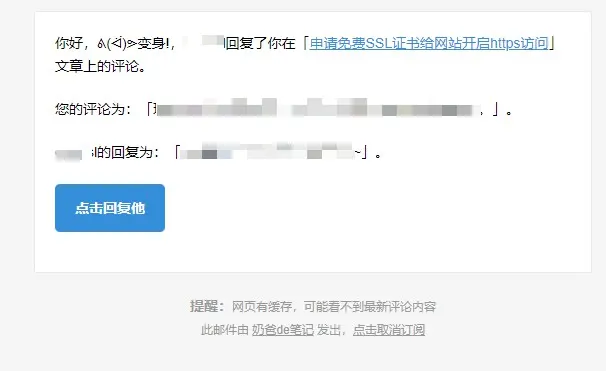
Wenprise Better Emails可以美化 WordPress 評論審覈通知郵件,評論通知文章作者的郵件,增加回複評論時,發送郵件通知給評論作者的功能。
來源作者推薦這款Wenprise Better Emails插件的原因有以下幾點:
- 能實現評論時郵件回覆通知,安裝即用,適合新手;
- 國人制作的插件,符合使用習慣,界面也漂亮;
- 帶有取消訂閱功能,能減少郵件被判定爲垃圾郵件的幾率。
插件安裝地址:https://wordpress.org/plugins/wenprise-better-emails/
代碼和插件都不能用?
使用評論郵件通知有一個前提條件,就是你的服務器可以發送郵件。
而實際上大多數主機都不支持直接發送郵件的,所以需要藉助第三方插件來實現主機發送郵件,也就是使用SMTP的方式來發送郵件,你可以參考下面的文章。
來源作者使用過的WordPress郵件插件推薦
另外,Comment Approved這款插件來源作者也用過,是評論審覈後給對方發郵件告訴他評論審覈通過了。
本站整理公開產品資料與建站知識,介紹不代表實際使用測試。功能、價格、授權和支援範圍請在購買前向提供方確認。 閱讀推廣披露





SHARE YOUR QUESTIONS
交流與討論
分享你的問題和經驗。請勿釋出廣告、敏感資訊或未經核實的評價。