
寶塔面板修改nginx配置支持Converter for Media插件
本文圍繞“寶塔面板修改nginx配置支持Converter for Media插件”整理操作說明與配置思路。界面名稱可能隨軟件版本調整,修改線上網站前請保存備份。涉及使用體驗的描述屬於來源作者,本頁未提供獨立實測結論。 Converter for Media是WordPress平臺一款熱門的將圖片免

基本資訊
- 資料範圍
- 完整文章正文,已清理外鏈和來源推廣
- 正文插圖
- 2個真實URL;2張已本地化,其餘使用原圖待補
本文圍繞“寶塔面板修改nginx配置支持Converter for Media插件”整理操作說明與配置思路。界面名稱可能隨軟件版本調整,修改線上網站前請保存備份。涉及使用體驗的描述屬於來源作者,本頁未提供獨立實測結論。
Converter for Media是WordPress平臺一款熱門的將圖片免費轉換爲webp格式的插件,默認情況來源作者使用寶塔面板建站時服務器軟件都是選擇的nginx,這個情況下,需要手動配置nginx的配置來讓Converter for Media正常工作。新手可能看不懂官方的文檔,所以本文來源作者手把手教大家在寶塔面板修改網站的nginx配置文件以保證Converter for Media的正常工作。
1、打開寶塔面板的網站設置界面
在寶塔面板的網站列表裏面,選擇你需要配置的網站,切換到配置文件界面,把默認內容先複製一份到本地保存備用。
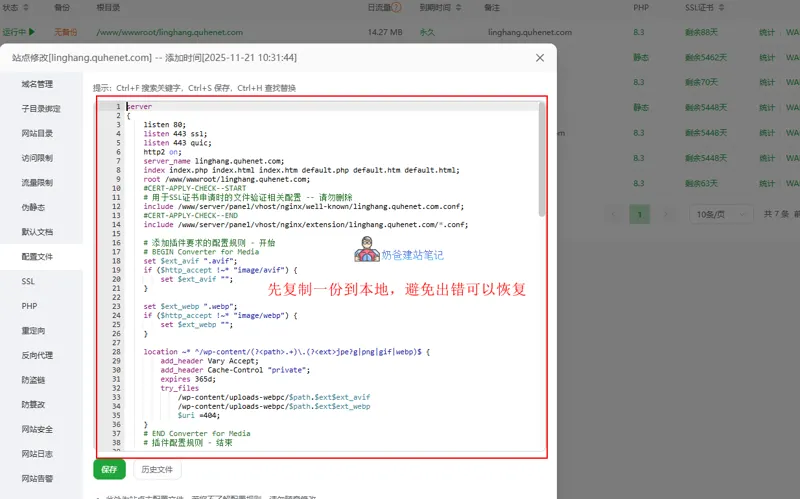
2、修改配置文件
需要添加的代碼
# BEGIN Converter for Media
    set $ext_avif ".avif";
    if ($http_accept !~* "image/avif") {
        set $ext_avif "";
    }

    set $ext_webp ".webp";
    if ($http_accept !~* "image/webp") {
        set $ext_webp "";
    }

    location ~* ^/wp-content/(?<path>.+).(?<ext>jpe?g|png|gif|webp)$ {
        add_header Vary Accept;
        add_header Cache-Control "private";
        expires 365d;
        try_files
            /wp-content/uploads-webpc/$path.$ext$ext_avif
            /wp-content/uploads-webpc/$path.$ext$ext_webp
            $uri =404;
    }
    # END Converter for Media
添加到準確的位置
Converter for Media的配置文件需要添加到對應的位置才能確保正常工作。具體的位置要求如下:
- 在
server { ... }塊內 - 在其他
location { ... }指令之前 - 在所有
include指令之前
你可以參考上面的截圖信息,大概在14行之後添加。
修改現有圖片處理規則
找到原配置文件下面的內容:
location ~ .*.(gif|jpg|jpeg|png|bmp|swf)$
{
    expires      30d;
    error_log /dev/null;
    access_log /dev/null;
}
修改爲下面的內容:
location ~ .*.(bmp|swf)$
{
    expires      30d;
    error_log /dev/null;
    access_log /dev/null;
}
然後點擊保存,沒有報錯則證明修改準確。
3、測試插件是否正常工作
完成上面的配置修改後,只要寶塔面板沒有報錯,插件就應該可以正常工作了,你這個時候可以回到插件設置界面看看是否還有需要配置的提示,如果沒有了提示並且你可以正常設置插件的選項或者批量處理之前的圖片。那麼就證明插件正常工作了。
4、如何檢測圖片是否變成了webp格式
你從網站前臺查看圖片地址或者保存圖片,都是之前的格式,並沒有變成webp,這種情況是正常的,插件作者專門發文解釋了原因:該插件不會更改圖片的URL,因此在查看網站源代碼時,您將始終看到默認圖片的URL。插件會創建重定向以輸出WebP和AVIF格式的文件,更改這些圖片的MIME類型,但不會更改URL。
插件的工作流程如下:
瀏覽器請求: GET https://edgeone.naibabiji.com/wp-content/uploads/photo.jpg
↓
插件檢測瀏覽器支持WebP格式
↓
服務器內部重定向到: /wp-content/uploads-webpc/photo.jpg.webp
↓
瀏覽器收到WebP格式圖片,但地址欄仍顯示photo.jpg
這種設計的優勢
- SEO友好:URL結構保持不變,不影響搜索引擎優化
- 兼容性:不支持新格式的老瀏覽器仍能收到原始格式圖片
- 無侵入性:不需要修改主題模板或頁面內容
- 自動化:用戶無感知,完全後臺自動處理
如何驗證:
要確認插件是否正常工作,不要查看網頁源代碼,而是:
- 瀏覽器開發者工具(鼠標右鍵或者快捷鍵F12) → 網絡(Network)標籤
- 刷新頁面查看圖片請求
- 檢查響應頭中的
Content-Type字段 - 應該看到
image/webp或image/avif而不是image/jpeg
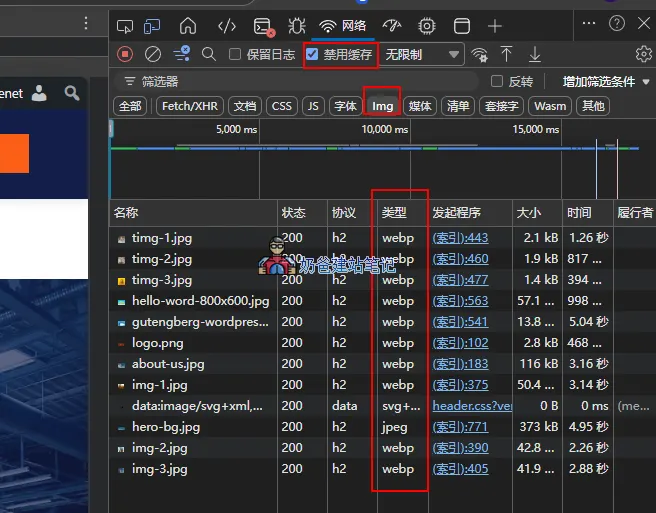
當你發現某張圖還是老格式,證明轉換後的圖比原圖大,所以插件拋棄了那張圖的處理。
使用Cloudflare CDN發現圖片沒轉換成功?
如果你使用的Cloudflare免費CDN,那麼查看源代碼返現還是原始的jpg或者png圖片,並沒有輸出webp格式的圖,這是因爲插件需要藉助瀏覽器的Accept 判斷返回 WebP 還是 AVIF,這個功能免費版Cloudflare不支持,而Converter for Media默認也不會改變圖片的url,所以CF那邊識別到的就是 yuantu.jpg
來源作者要做的就是讓圖片支持變爲 yuantu.jpg.webp 這樣cf就會同時緩存jpg和webp兩個圖,將下面的代碼添加到你主題函數文件。
/**
 * WordPress + Cloudflare Free + Converter for Media
 * 僅在 WebP 文件真實存在時,將 jpg/png 圖片包裝爲 picture。
 * 支持 uploads 目錄 + 當前主題目錄圖片。
 */

function nbj_get_webp_info($src, $uploads) {
    $src_raw  = html_entity_decode($src);
    $src_path = parse_url(esc_url_raw($src_raw), PHP_URL_PATH);

    if (!$src_path || strpos($src_path, '..') !== false) {
        return false;
    }

    /**
     * 1. 處理媒體庫 uploads 圖片
     */
    $uploads_baseurl = $uploads['baseurl'];
    $uploads_basedir = $uploads['basedir'];

    $uploads_base_path = parse_url(esc_url_raw($uploads_baseurl), PHP_URL_PATH);

    if ($uploads_base_path && strpos($src_path, $uploads_base_path . '/') === 0) {
        $relative = ltrim(substr($src_path, strlen($uploads_base_path)), '/');

        if (!$relative) {
            return false;
        }

        $webp_url  = str_replace('https://edgeone.naibabiji.com/wp-content/uploads/', '/wp-content/uploads-webpc/uploads/', $src_raw) . '.webp';
        $webp_path = dirname($uploads_basedir) . '/uploads-webpc/uploads/' . $relative . '.webp';

        return [
            'url'  => $webp_url,
            'path' => $webp_path,
        ];
    }

    /**
     * 2. 處理當前主題目錄圖片
     * 規則:/wp-content/themes/your-theme/xxx.jpg
     * 對應:/wp-content/themes/your-theme/xxx.jpg.webp
     */
    $theme_baseurl = get_stylesheet_directory_uri();
    $theme_basedir = get_stylesheet_directory();

    $theme_base_path = parse_url(esc_url_raw($theme_baseurl), PHP_URL_PATH);

    if ($theme_base_path && strpos($src_path, $theme_base_path . '/') === 0) {
        $relative = ltrim(substr($src_path, strlen($theme_base_path)), '/');

        if (!$relative) {
            return false;
        }

        $webp_url  = $src_raw . '.webp';
        $webp_path = rtrim($theme_basedir, '/') . '/' . $relative . '.webp';

        return [
            'url'  => $webp_url,
            'path' => $webp_path,
        ];
    }

    return false;
}

function nbj_wrap_webp_picture($content) {
    if (is_admin() || is_feed() || (defined('REST_REQUEST') && REST_REQUEST)) {
        return $content;
    }

    if (stripos($content, '<img') === false) {
        return $content;
    }

    $uploads = wp_upload_dir();

    // 支持 jpg/png,以及 jpg/png 後面帶 query string 的情況
    $pattern = '/<imgb[^>]*bsrc=(["'])([^"']+.(?:jpe?g|png)(?:?[^"']*)?)1[^>]*>/i';

    return preg_replace_callback($pattern, function ($m) use ($uploads) {
        $img_tag = $m[0];
        $src     = html_entity_decode($m[2]);

        if (
            strpos($img_tag, 'data-nbj-webp') !== false ||
            strpos($src, 'uploads-webpc') !== false ||
            strpos($src, '.webp') !== false
        ) {
            return $img_tag;
        }

        $webp = nbj_get_webp_info($src, $uploads);

        if (!$webp || !is_file($webp['path'])) {
            return $img_tag;
        }

        $img_tag = preg_replace('/<imgb/i', '<img data-nbj-webp="1"', $img_tag, 1);

        return '<picture data-nbj-webp="1">'
            . '<source srcset="' . esc_url($webp['url']) . '" type="image/webp">'
            . $img_tag
            . '</picture>';
    }, $content);
}

add_filter('the_content', 'nbj_wrap_webp_picture', 999);
add_filter('widget_text_content', 'nbj_wrap_webp_picture', 999);

add_action('template_redirect', function () {
    if (
        !is_admin()
        && !is_feed()
        && !(defined('REST_REQUEST') && REST_REQUEST)
        && ob_get_level() === 0
    ) {
        ob_start('nbj_wrap_webp_picture');
    }
});本站整理公開產品資料與建站知識,介紹不代表實際使用測試。功能、價格、授權和支援範圍請在購買前向提供方確認。 閱讀推廣披露





SHARE YOUR QUESTIONS
交流與討論
分享你的問題和經驗。請勿釋出廣告、敏感資訊或未經核實的評價。