
給WordPress網站添加線段吸附鼠標特效
本文圍繞“給WordPress網站添加線段吸附鼠標特效”整理操作說明與配置思路。界面名稱可能隨軟件版本調整,修改線上網站前請保存備份。涉及使用體驗的描述屬於來源作者,本頁未提供獨立實測結論。 如果你經常逛博客圈,那麼你肯定看到過有些博客的背景有很多的線條,會跟着你鼠標指針進行吸附。這個特效是怎麼弄出
基本資訊
- 資料範圍
- 完整文章正文,已清理外鏈和來源推廣
- 正文插圖
- 2個真實URL;2張已本地化,其餘使用原圖待補
本文圍繞“給WordPress網站添加線段吸附鼠標特效”整理操作說明與配置思路。界面名稱可能隨軟件版本調整,修改線上網站前請保存備份。涉及使用體驗的描述屬於來源作者,本頁未提供獨立實測結論。
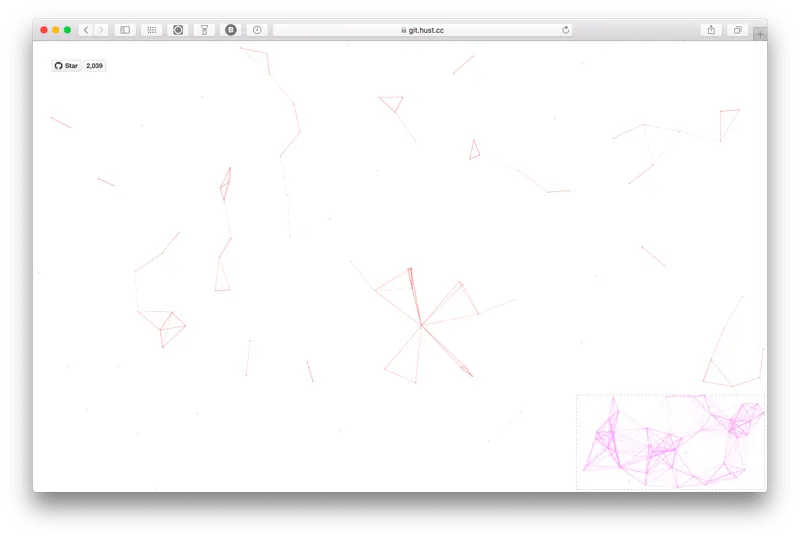
如果你經常逛博客圈,那麼你肯定看到過有些博客的背景有很多的線條,會跟着你鼠標指針進行吸附。這個特效是怎麼弄出來的呢?很簡單,調用搞一個js文件就可以了。這個js文件很小巧,所以不用擔心對性能產生影響。
效果如下:
 代碼版使用方法
把下面這串代碼複製了保存爲一個js文件,你也可以直接去Github下載
注:這個代碼所有網站都可以使用,並非只有WordPress。
!function(){"use strict";function e(e){return e&&e.__esModule&&Object.prototype.hasOwnProperty.call(e,"default")?e.default:e}function t(e,t){return e(t={exports:{}},t.exports),t.exports}var n=t(function(e,t){Object.defineProperty(t,"__esModule",{value:!0});var n=1;t.default=function(){return""+n++},e.exports=t.default});e(n);var o=t(function(e,t){Object.defineProperty(t,"__esModule",{value:!0}),t.default=function(e){var t=arguments.length>1&&void 0!==arguments[1]?arguments[1]:30,n=null;return function(){for(var o=this,i=arguments.length,r=Array(i),a=0;a<i;a++)r[a]=arguments[a];clearTimeout(n),n=setTimeout(function(){e.apply(o,r)},t)}},e.exports=t.default});e(o);var i=t(function(e,t){Object.defineProperty(t,"__esModule",{value:!0});t.SizeSensorId="size-sensor-id",t.SensorStyle="display:block;position:absolute;top:0;left:0;height:100%;width:100%;overflow:hidden;pointer-events:none;z-index:-1;opacity:0",t.SensorClassName="size-sensor-object"});e(i);i.SizeSensorId,i.SensorStyle,i.SensorClassName;var r=t(function(e,t){Object.defineProperty(t,"__esModule",{value:!0}),t.createSensor=void 0;var n,r=(n=o)&&n.__esModule?n:{default:n};t.createSensor=function(e){var t=void 0,n=[],o=(0,r.default)(function(){n.forEach(function(t){t(e)})}),a=function(){t&&t.parentNode&&(t.contentDocument.defaultView.removeEventListener("resize",o),t.parentNode.removeChild(t),t=void 0,n=[])};return{element:e,bind:function(r){t||(t=function(){"static"===getComputedStyle(e).position&&(e.style.position="relative");var t=document.createElement("object");return t.onload=function(){t.contentDocument.defaultView.addEventListener("resize",o),o()},t.setAttribute("style",i.SensorStyle),t.setAttribute("class",i.SensorClassName),t.type="text/html",e.appendChild(t),t.data="about:blank",t}()),-1===n.indexOf(r)&&n.push(r)},destroy:a,unbind:function(e){var o=n.indexOf(e);-1!==o&&n.splice(o,1),0===n.length&&t&&a()}}}});e(r);r.createSensor;var a=t(function(e,t){Object.defineProperty(t,"__esModule",{value:!0}),t.createSensor=void 0;var n,i=(n=o)&&n.__esModule?n:{default:n};t.createSensor=function(e){var t=void 0,n=[],o=(0,i.default)(function(){n.forEach(function(t){t(e)})}),r=function(){t.disconnect(),n=[],t=void 0};return{element:e,bind:function(i){t||(t=function(){var t=new ResizeObserver(o);return t.observe(e),o(),t}()),-1===n.indexOf(i)&&n.push(i)},destroy:r,unbind:function(e){var o=n.indexOf(e);-1!==o&&n.splice(o,1),0===n.length&&t&&r()}}}});e(a);a.createSensor;var s=t(function(e,t){Object.defineProperty(t,"__esModule",{value:!0}),t.createSensor=void 0;t.createSensor="undefined"!=typeof ResizeObserver?a.createSensor:r.createSensor});e(s);s.createSensor;var u=t(function(e,t){Object.defineProperty(t,"__esModule",{value:!0}),t.removeSensor=t.getSensor=void 0;var o,r=(o=n)&&o.__esModule?o:{default:o};var a={};t.getSensor=function(e){var t=e.getAttribute(i.SizeSensorId);if(t&&a[t])return a[t];var n=(0,r.default)();e.setAttribute(i.SizeSensorId,n);var o=(0,s.createSensor)(e);return a[n]=o,o},t.removeSensor=function(e){var t=e.element.getAttribute(i.SizeSensorId);e.element.removeAttribute(i.SizeSensorId),e.destroy(),t&&a[t]&&delete a[t]}});e(u);u.removeSensor,u.getSensor;var c=t(function(e,t){Object.defineProperty(t,"__esModule",{value:!0}),t.clear=t.bind=void 0;t.bind=function(e,t){var n=(0,u.getSensor)(e);return n.bind(t),function(){n.unbind(t)}},t.clear=function(e){var t=(0,u.getSensor)(e);(0,u.removeSensor)(t)}});e(c);var l=c.clear,d=c.bind,v=window.requestAnimationFrame||window.webkitRequestAnimationFrame||window.mozRequestAnimationFrame||window.msRequestAnimationFrame||window.oRequestAnimationFrame||function(e){return window.setTimeout(e,1e3/60)},f=window.cancelAnimationFrame||window.webkitCancelAnimationFrame||window.mozCancelAnimationFrame||window.msCancelAnimationFrame||window.oCancelAnimationFrame||window.clearTimeout,m=function(e){return new Array(e).fill(0).map(function(e,t){return t})},h=Object.assign||function(e){for(var t=1;t<arguments.length;t++){var n=arguments[t];for(var o in n)Object.prototype.hasOwnProperty.call(n,o)&&(e[o]=n[o])}return e},p=function(){function e(e,t){for(var n=0;n<t.length;n++){var o=t[n];o.enumerable=o.enumerable||!1,o.configurable=!0,"value"in o&&(o.writable=!0),Object.defineProperty(e,o.key,o)}}return function(t,n,o){return n&&e(t.prototype,n),o&&e(t,o),t}}();var y=function(){function e(t,n){var o=this;!function(e,t){if(!(e instanceof t))throw new TypeError("Cannot call a class as a function")}(this,e),this.randomPoints=function(){return m(o.c.count).map(function(){return{x:Math.random()*o.canvas.width,y:Math.random()*o.canvas.height,xa:2*Math.random()-1,ya:2*Math.random()-1,max:6e3}})},this.el=t,this.c=h({zIndex:-1,opacity:.5,color:"0,0,0",pointColor:"0,0,0",count:99},n),this.canvas=this.newCanvas(),this.context=this.canvas.getContext("2d"),this.points=this.randomPoints(),this.current={x:null,y:null,max:2e4},this.all=this.points.concat([this.current]),this.bindEvent(),this.requestFrame(this.drawCanvas)}return p(e,[{key:"bindEvent",value:function(){var e=this;d(this.el,function(){e.canvas.width=e.el.clientWidth,e.canvas.height=e.el.clientHeight}),this.onmousemove=window.onmousemove,window.onmousemove=function(t){e.current.x=t.clientX-e.el.offsetLeft+document.scrollingElement.scrollLeft,e.current.y=t.clientY-e.el.offsetTop+document.scrollingElement.scrollTop,e.onmousemove&&e.onmousemove(t)},this.onmouseout=window.onmouseout,window.onmouseout=function(){e.current.x=null,e.current.y=null,e.onmouseout&&e.onmouseout()}}},{key:"newCanvas",value:function(){"static"===getComputedStyle(this.el).position&&(this.el.style.position="relative");var e,t=document.createElement("canvas");return t.style.cssText="display:block;position:absolute;top:0;left:0;height:100%;width:100%;overflow:hidden;pointer-events:none;z-index:"+(e=this.c).zIndex+";opacity:"+e.opacity,t.width=this.el.clientWidth,t.height=this.el.clientHeight,this.el.appendChild(t),t}},{key:"requestFrame",value:function(e){var t=this;this.tid=v(function(){return e.call(t)})}},{key:"drawCanvas",value:function(){var e=this,t=this.context,n=this.canvas.width,o=this.canvas.height,i=this.current,r=this.points,a=this.all;t.clearRect(0,0,n,o);var s=void 0,u=void 0,c=void 0,l=void 0,d=void 0,v=void 0;r.forEach(function(r,f){for(r.x+=r.xa,r.y+=r.ya,r.xa*=r.x>n||r.x<0?-1:1,r.ya*=r.y>o||r.y<0?-1:1,t.fillStyle="rgba("+e.c.pointColor+")",t.fillRect(r.x-.5,r.y-.5,1,1),u=f+1;u<a.length;u++)null!==(s=a[u]).x&&null!==s.y&&(l=r.x-s.x,d=r.y-s.y,(v=l*l+d*d)<s.max&&(s===i&&v>=s.max/2&&(r.x-=.03*l,r.y-=.03*d),c=(s.max-v)/s.max,t.beginPath(),t.lineWidth=c/2,t.strokeStyle="rgba("+e.c.color+","+(c+.2)+")",t.moveTo(r.x,r.y),t.lineTo(s.x,s.y),t.stroke()))}),this.requestFrame(this.drawCanvas)}},{key:"destroy",value:function(){l(this.el),window.onmousemove=this.onmousemove,window.onmouseout=this.onmouseout,f(this.tid),this.canvas.parentNode.removeChild(this.canvas)}}]),e}();y.version="2.0.4";var w,b;new y(document.body,(w=document.getElementsByTagName("script"),{zIndex:(b=w[w.length-1]).getAttribute("zIndex"),opacity:b.getAttribute("opacity"),color:b.getAttribute("color"),pointColor:b.getAttribute("pointColor"),count:Number(b.getAttribute("count"))||99}))}();
假設你保存的文件是canvas-nest.js,上傳到服務器的dist文件夾下面的。
然後在你WordPress網站的頁腳footer.php文件</body>之前添加下面這串代碼。
<script type="text/javascript" src="dist/canvas-nest.js"></script>
自定義顯示效果
color: 線條顏色, 默認: ‘0,0,0’ ;三個數字分別爲(R,G,B),注意用,分割
pointColor: 交點顏色, 默認: ‘0,0,0’ ;三個數字分別爲(R,G,B),注意用,分割
opacity: 線條透明度(0~1), 默認: 0.5
count: 線條的總數量, 默認: 150
zIndex: 背景的z-index屬性,css屬性用於控制所在層的位置, 默認: -1
例如下面這樣
<script type="text/javascript" color="0,0,255" opacity='0.7' zIndex="-2" count="99" src="dist/canvas-nest.js"></script>
注意: 所有的配置項都有默認值,如果你不知道怎麼設置,可以先不設置這些配置項,就使用默認值看看效果也可以的。
如果你覺得代碼版本的很難,你也可以使用插件版
WordPress Canvas插件下載
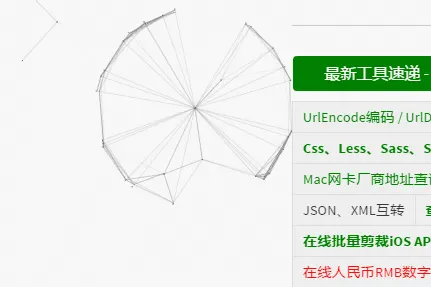
canvas-nest.js是github上一個很炫酷的開源項目,項目使用不到2kb的Javascript代碼構造一個很炫酷的網頁背景效果,項目地址爲:https://github.com/aTool-org/canvas-nest.js
本wordpress插件是利用上述項目完成的另外一個開源項目(https://github.com/aTool-org/canvas-nest-for-wp),這個項目是一個wordpress插件,並且發佈到wordpress.org官網上。
插件下載地址:https://wordpress.org/plugins/canvas-nestjs/
給評論區添加打字煙花效果
除了網頁背景特效外,你可能也注意到本博客評論區打字有煙花特效,沒注意的話你可以去評論試試看。
實現方法很簡單,參見:WordPress評論界面添加煙花????效果
本站整理公開產品資料與建站知識,介紹不代表實際使用測試。功能、價格、授權和支援範圍請在購買前向提供方確認。 閱讀推廣披露





SHARE YOUR QUESTIONS
交流與討論
分享你的問題和經驗。請勿釋出廣告、敏感資訊或未經核實的評價。